
Close Menu
    Facebook X (Twitter) Instagram
    Trending
    • How to Export Kinnow from Pakistan in 2026 A Complete Step-by-Step Guide
    • How We Export Products Directly from Joria Bazaar Karachi A Behind-the-Scenes Look at Live Container Loading
    • Top Pakistani Products Exported to Saudi Arabia Complete Export Guide for Maximum Profit (2026)
    • Copper Mining in Balochistan A Golden Export Opportunity Pakistan Cannot Afford to Miss
    • How Pakistani Handmade Pottery Is Winning Export Orders 2 Containers Shipped to UK & UAE
    • Top Pakistani Products Exported to the UK-Complete Export Guide 2026
    • How to Export Sports Goods from Pakistan A Complete Guide for Beginners (2026)
    • Export Payment Secrets How Much Money Do You Really Get After Taxes & Charges (Reality Check)
    Facebook X (Twitter) Instagram YouTube
    PakistanCustoms.net – Help You to be an Entrepreneur
    • Home
    • Export
    • Import
    • Valuation Ruling
    • Customs News
    PakistanCustoms.net – Help You to be an Entrepreneur
    Home » Add Customs Clearing Agents License Number in Weboc.
    Customs Agents & Clearing

    Add Customs Clearing Agents License Number in Weboc.

    April 17, 2014Updated:June 8, 20262 Mins Read
    Share
    Facebook Twitter LinkedIn Pinterest Email
    Add Customs Clearing Agents License Number in Weboc.


    Often it happens when Importer and Exporter want to change CC (Customs Clearing) agent or add a new one so they provide their WeBoc id and password to clearing agent and CC agent do this job. Even though it’s not a rocket science, In few steps importer or exporter can do this easily.
    Therefore, Today In this article we will learn how to add Customs Clearing Agent ‘s name in WeBoc.


    Add Customs Clearing Agents License Number in WeBoc.

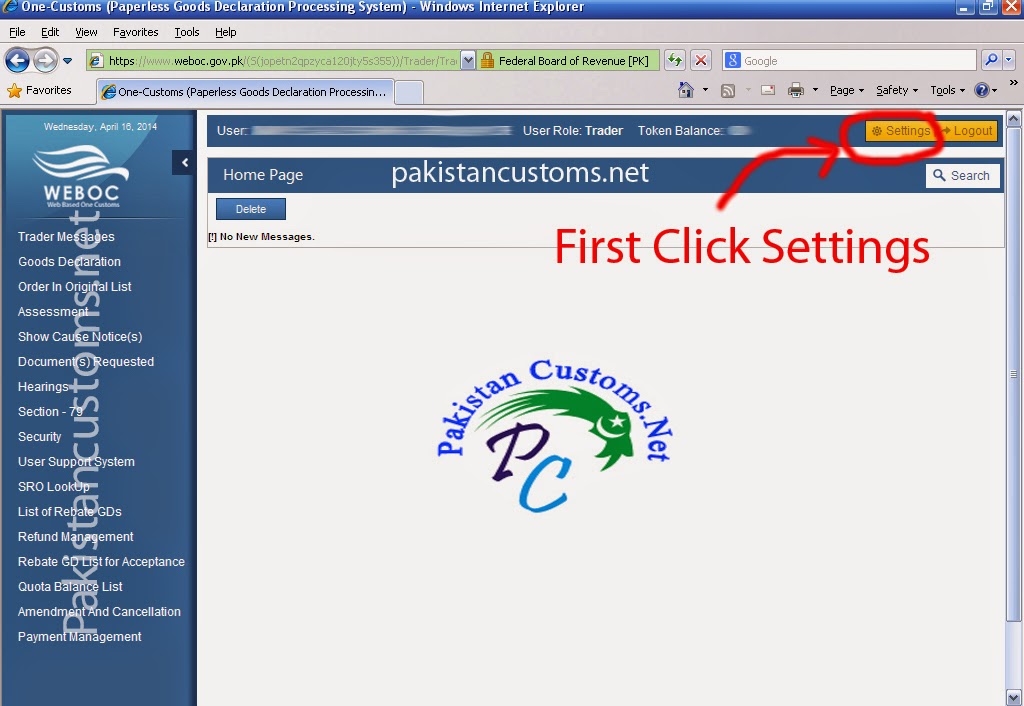
    1- First Step :-
    First of all Click Here  and Login in WeBoc (Web Based One Customs) using your username and password, After login, you see a page as shown in below image now click setting as indicating in the image.
    Add-Clearing-Agent-Name-in-Weboc

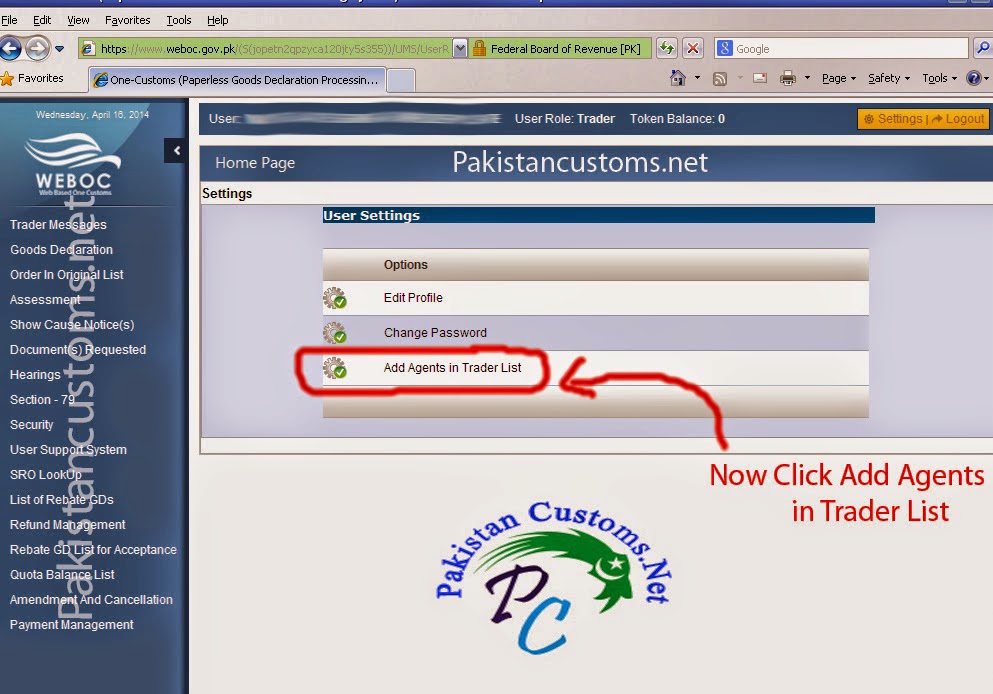
    2- Second Step :-
    Once click on setting the second page will appear as you can see in below image, Now click on ” Add Agents In Trader List ”
    Add-Agents-in-Trader-List-Weboc

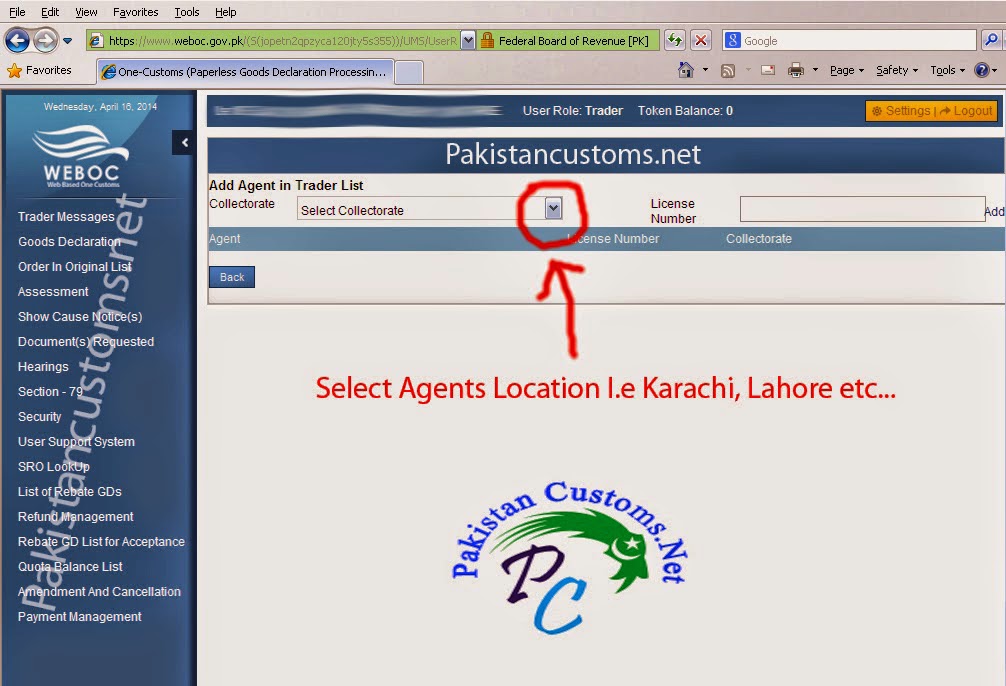
    3- Third Step :-
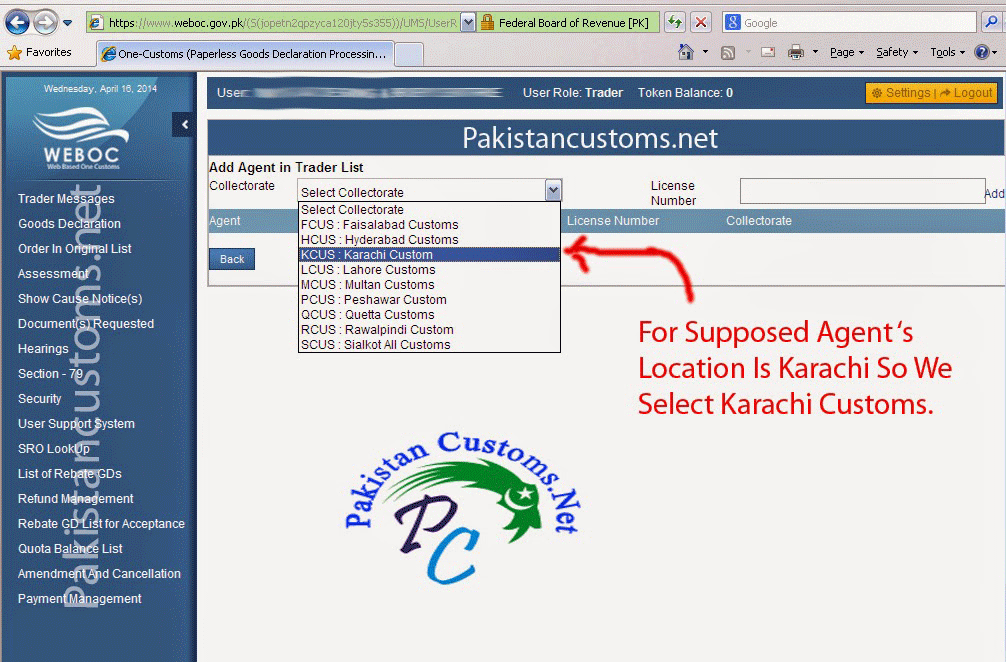
    Now select Agents Location as can be seen in the below picture !
    Select-Agents-Location-in-Weboc


    Supposed agent ‘s location is Karachi so we select Karachi Customs.
    Add Clearing Agent In WeBoc

    4- Final Step :-
    Now we will add customs clearing agent license number which is provided by clearing agent or asked them their License no. (CHAL No.) and once you know agents’ license number so write in the box as mention in the image below and click the add button.
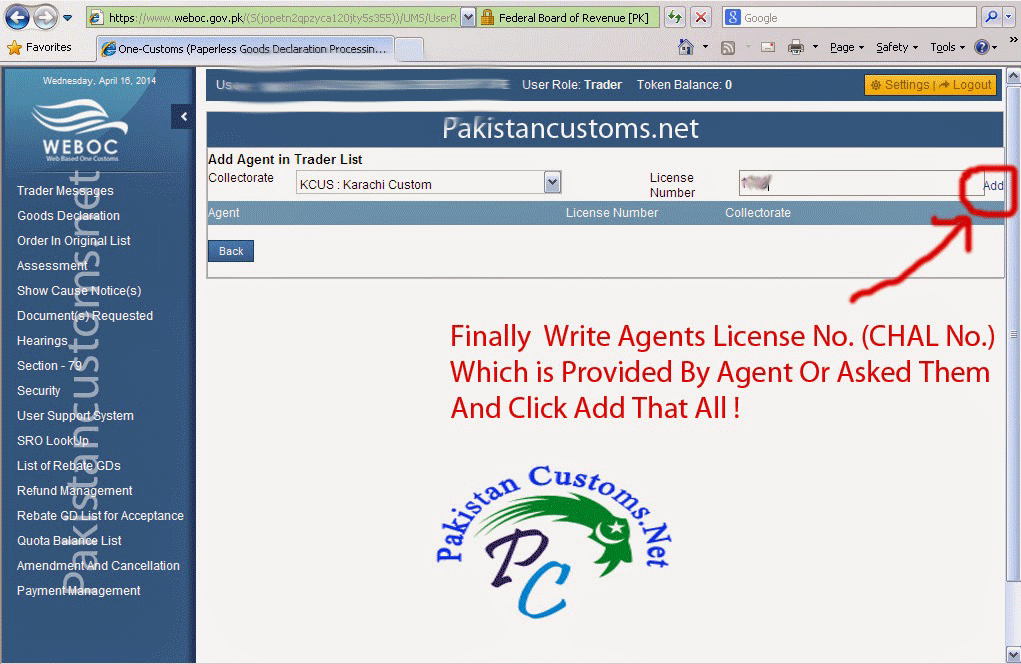
    Customs-Clearing-Agents-In-Weboc


    Other Topic Related To The WeBoc :-

    1-Procedure To File WeBoc GD in WeBoc System In Pakistan.
    2-Check Container Releasing Status In WeBoc System.
    3-Container Already in Customs process (How To Solve This Issue).


     Note:All the Information in this Article Just For Information Purpose!

    Share. Facebook Twitter Pinterest LinkedIn WhatsApp Reddit Tumblr Email
    Narinder Maheshwary

    Related Posts

    Is Hiring a Customs Agent Necessary for Import-Export in Pakistan?

    June 19, 2023

    Advantages and Disadvantages of Working with Customs Clearing Agent in Pakistan (Benefits & Losses)

    May 16, 2021

    Why Customs Agent Hesitate to Work with New Trader in Pakistan – Customs House Agents Fear

    November 9, 2018
    Leave A Reply Cancel Reply

    Get Your Website
    nvj-developers-advertisement-banner

    How to Export Kinnow from Pakistan in 2026 A Complete Step-by-Step Guide

    June 12, 2026

    How We Export Products Directly from Joria Bazaar Karachi A Behind-the-Scenes Look at Live Container Loading

    June 11, 2026

    Top Pakistani Products Exported to Saudi Arabia Complete Export Guide for Maximum Profit (2026)

    June 10, 2026

    Copper Mining in Balochistan A Golden Export Opportunity Pakistan Cannot Afford to Miss

    June 9, 2026

    How to Export Kinnow from Pakistan in 2026 A Complete Step-by-Step Guide

    By PritamJune 12, 20260

    Introduction Why Exporting Kinnow from Pakistan Is a Great Chance Pakistan grows one of the…

    How We Export Products Directly from Joria Bazaar Karachi A Behind-the-Scenes Look at Live Container Loading

    June 11, 2026

    Top Pakistani Products Exported to Saudi Arabia Complete Export Guide for Maximum Profit (2026)

    June 10, 2026

    Copper Mining in Balochistan A Golden Export Opportunity Pakistan Cannot Afford to Miss

    June 9, 2026

    Subscribe to Updates

    Get the latest creative news from FooBar about art, design and business.

    About PakistanCustoms.Net

    PakistanCustoms.net is Pakistan’s first in-depth website where discussed complete customs clearance procedure in detail, Also share tips to clear customs examination for import and export, Provide daily customs news and useful ideas to facilitate the business person…Read more

    Disclaimer: PakistanCustoms.Net is not a official Website of Pakistan Customs, This Website is only for information purpose Read More.

    Quick Links
    • Home
    • About Us
    • Export
    • Import
    • Customs Clearance
    • Shipping & Logistics
    • Trade Finance
    • Valuation Ruling
    • Comment Policy
    • Copyright Policy
    • Disclaimer

    How to Export Kinnow from Pakistan in 2026 A Complete Step-by-Step Guide

    June 12, 2026

    How We Export Products Directly from Joria Bazaar Karachi A Behind-the-Scenes Look at Live Container Loading

    June 11, 2026

    Top Pakistani Products Exported to Saudi Arabia Complete Export Guide for Maximum Profit (2026)

    June 10, 2026

    Copper Mining in Balochistan A Golden Export Opportunity Pakistan Cannot Afford to Miss

    June 9, 2026
    Facebook X (Twitter) Instagram Pinterest
    • Home
    • About Us
    • Export
    • Import
    • Customs Clearance
    • Shipping & Logistics
    • Trade Finance
    • Valuation Ruling
    • Comment Policy
    • Copyright Policy
    • Disclaimer
    © 2026 Pakistancustoms.net. Managed by NVJ Developers & Designers.

    Type above and press Enter to search. Press Esc to cancel.

    Go to mobile version