Close Menu
    Facebook X (Twitter) Instagram
    Trending
    • Top Pakistani Products Exported to UAE A Complete Guide
    • How to Write a Professional Export Email to Buyers A Step-by-Step Guide to Win More Orders
    • How to Start Import Business in Pakistan 2026 Complete Step-by-Step Guide (Import Kaise Karein)
    • Documents Required to Start Import Business in Pakistan
    • Top Pakistani Products Exported to China in 2026 High Demand Products & Beginner Tips
    • Top Pakistani Products Exported to Germany in 2026
    • How to Register for an Import License in Pakistan Latest 2026 Method
    • Top Pakistani Products Exported to Bangladesh in 2026
    Facebook X (Twitter) Instagram YouTube
    PakistanCustoms.net – Help You to be an Entrepreneur
    • Home
    • Export
    • Import
    • Valuation Ruling
    • Customs News
    PakistanCustoms.net – Help You to be an Entrepreneur
    Home » How to Add Bank-Approved Electronic Form-E in WeBOC – Step-by-Step Guide
    Export

    How to Add Bank-Approved Electronic Form-E in WeBOC – Step-by-Step Guide

    November 7, 2015Updated:February 7, 20262 Mins Read
    Share
    Facebook Twitter LinkedIn Pinterest Email
    Procedure-To-Attach-Electronic-Form-E-In-Weboc-GD

    How Clearing Agent Will Add Electronic Form-E In Weboc ?

    Do you really want to know, What is a procedure to add approved Electronic Form-E in Weboc? If yes, then of course this is a right place for you, here we are going to discuss how a customs clearing agent will add the banks approved Electronic E-Form in WeBoc and In our previous post where we already described the complete process how an Export submit the Electronic Form-E issuance request in WeBoc.

    Procedure To Attach Electronic Form-E In Weboc GD:-
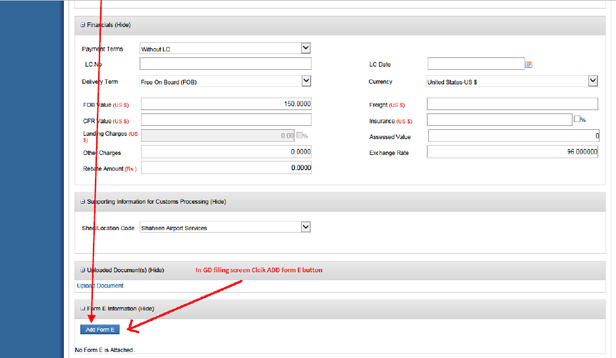
    At the time of GD filing process, first we will enter other particulars after that click on ‘ADD FORM-E’ button in Form-E information section as shown in the image below.


    Add-Electronic-Form-E

    When we clicked the ADD FORM-E button so following pop-up windows is shown, then search the required form-e number provided by the exporter in the given text box, once required form-e found so it will appear on your screen now tick mark check box and then click attach button,  once we clicked attach button system will validate the following particulars of the ‘Form-E’ with Goods declaration document (as shown in below screens) :

    a. Country
    b. Delivery Term
    c. Port of Discharge
    d. Consignee Name

    The System will re-validate with data with approved Form E information and data which claim in GD if its mismatch with each other than system show an error when attaching form-e in GD.

    Attached-Electronic-E-Form

    For Example:

    If agents provided information during the GD filing and approved Form-E information not match so following error will show on screen.

    —————————————— WeBoc`s Error —————————————–
    Form-E: ABL-2015-00000001 Mismatched Following Information provided in GD

    * Country
    * Delivery Term
    * Port of Discharge
    * Consignee Name

    —————————————————————————————————–
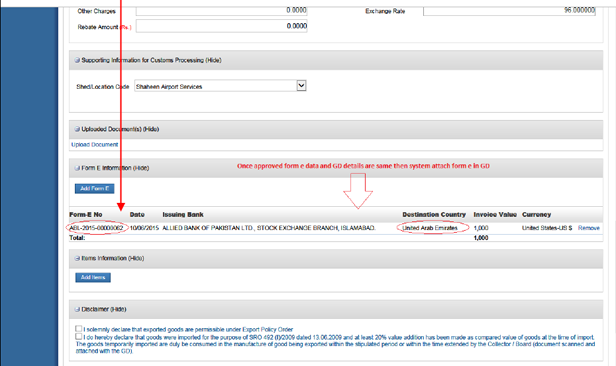
    After clicking on ‘ATTACH’ button, the system will validate it if approved form e data and GD details are same then system add this ‘Form-E’ in to your Goods Declaration, which will be displayed in the GD as shown below:
    Electronic-Form-E-Added-Weboc
    ———————————— XX—XX—-XX—XX —————————————

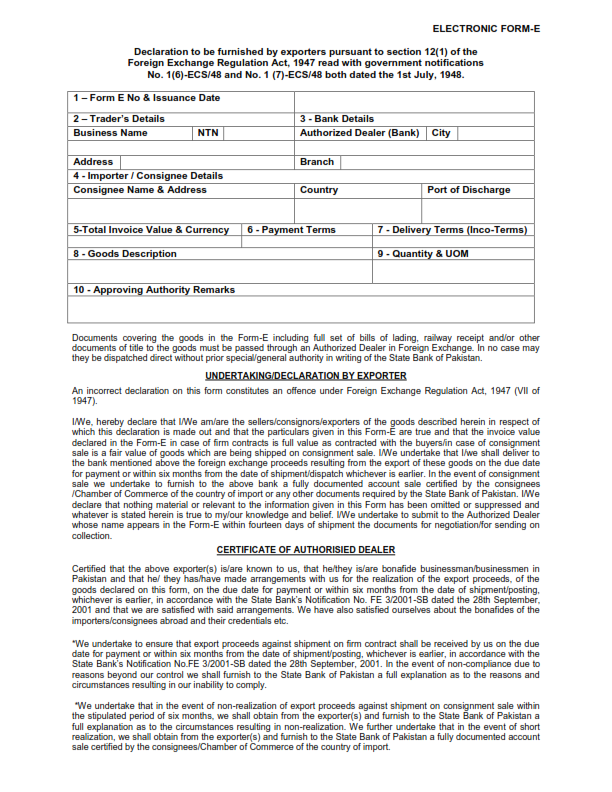
    WeBoc`s Electronic Form-E Sample:-

    Related Posts:-

    * GD Filing Time In Weboc
    * Changes In The WeBoc Software
    * How to Add Bank Branches In Weboc.
    * File Request For Issuance of Form E in Weboc.
    * License Renewal Procedure of Customs Clearing Agent
    * How to Create Online Electronic Form-E Issuance Request in WeBoc (Video Tutorial In Urdu).

    Share. Facebook Twitter Pinterest LinkedIn WhatsApp Reddit Tumblr Email
    Narinder Thonthia

    Related Posts

    Top Pakistani Products Exported to UAE A Complete Guide

    May 19, 2026

    How to Write a Professional Export Email to Buyers A Step-by-Step Guide to Win More Orders

    May 18, 2026

    How to Start Import Business in Pakistan 2026 Complete Step-by-Step Guide (Import Kaise Karein)

    May 16, 2026
    Leave A Reply Cancel Reply

    Get Your Website
    nvj-developers-advertisement-banner

    Top Pakistani Products Exported to UAE A Complete Guide

    May 19, 2026

    How to Write a Professional Export Email to Buyers A Step-by-Step Guide to Win More Orders

    May 18, 2026

    How to Start Import Business in Pakistan 2026 Complete Step-by-Step Guide (Import Kaise Karein)

    May 16, 2026

    Documents Required to Start Import Business in Pakistan

    May 15, 2026

    Top Pakistani Products Exported to UAE A Complete Guide

    By PritamMay 19, 20260

    In This Guide Pakistan–UAE Trade Overview All Products Being Exported from Pakistan to UAE Top…

    How to Write a Professional Export Email to Buyers A Step-by-Step Guide to Win More Orders

    May 18, 2026

    How to Start Import Business in Pakistan 2026 Complete Step-by-Step Guide (Import Kaise Karein)

    May 16, 2026

    Documents Required to Start Import Business in Pakistan

    May 15, 2026

    Subscribe to Updates

    Get the latest creative news from FooBar about art, design and business.

    About PakistanCustoms.Net

    PakistanCustoms.net is Pakistan’s first in-depth website where discussed complete customs clearance procedure in detail, Also share tips to clear customs examination for import and export, Provide daily customs news and useful ideas to facilitate the business person…Read more

    Disclaimer: PakistanCustoms.Net is not a official Website of Pakistan Customs, This Website is only for information purpose Read More.

    • Home
    • Export
    • Import
    • Valuation Ruling
    • Customs News

    Top Pakistani Products Exported to UAE A Complete Guide

    May 19, 2026

    How to Write a Professional Export Email to Buyers A Step-by-Step Guide to Win More Orders

    May 18, 2026

    How to Start Import Business in Pakistan 2026 Complete Step-by-Step Guide (Import Kaise Karein)

    May 16, 2026

    Documents Required to Start Import Business in Pakistan

    May 15, 2026
    Facebook X (Twitter) Instagram Pinterest
    • Home
    • About Us
    • Contact Us
    • Copyright Policy
    • Disclaimer
    • Comment Policy
    © 2026 Pakistancustoms.net. Managed by NVJ Developers & Designers.

    Type above and press Enter to search. Press Esc to cancel.

    Go to mobile version